

 By
By How to Learn Data Entry (Step-by-Step for Beginners)
If you’re searching for how to learn data entry, you’re probably looking for an easy skill that can help you start earning online quickly. The good news is — data entry is one of the simplest and most beginner-friendly online skills you can learn without any technical background.
In today’s digital world, businesses need people to manage, organize, and input data. That’s where data entry operators come in. Whether you’re a student, freelancer, or someone looking for part-time income, learning data entry can open doors to remote jobs and freelance opportunities.
In this guide, you’ll learn exactly how to learn data entry step by step, what skills you need, tools to use, and how to start earning.
What is Data Entry and How to Learn Data Entry Basics

Before jumping into how to learn data entry, you need to understand what it actually is.
Data entry is the process of entering, updating, or managing data in a computer system. This data can include:
Text,Numbers,Images,Customer information,Excel sheets
Types of Data Entry Jobs:
Typing work,Excel data entry,Copy-paste jobs,Form fillin,Data cleaning
To start learning data entry, you don’t need a degree — just basic computer knowledge and typing skills.If you’re serious about mastering how to learn data entry, focus on building these core skills:
- Typing Speed & Accuracy
30–50 words per minute (WPM)
High accuracy (90%+)
👉 Practice tools:
Typing websites
Daily 20–30 minutes practice
- Basic Computer Knowledge
You should know
MS Word
MS Excel
Google Docs
- Attention to Detail
Small mistakes can cause big problems. So accuracy is key.
- Time Management
Data entry jobs often have deadlines.
- Communication Skills
Helpful when working with clients online.
Best Tools to Learn Data Entry Like a Pro
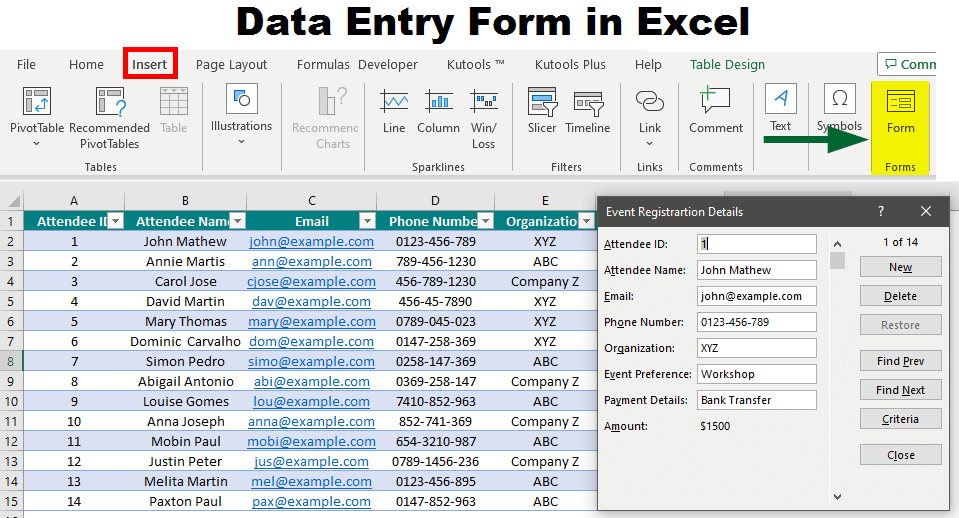
To master how to learn data entry, you must get comfortable with these tools:
🔹 Microsoft Excel
Data organization
Formulas
Sorting & filtering
🔹 Google Sheets
Online version of Excel
Used in freelance work
🔹 Microsoft Word
Document formatting
Typing work
🔹 Data Entry Software
CRM tools
Database systems
👉 Tip: Start with Excel it’s the most in-demand skill.
How to Learn Data Entry Step-by-Step (Beginner Roadmap)
Here is a simple roadmap to follow:
Step 1: Improve Typing Speed
Practice daily using typing tools.
Step 2: Learn Basic Excel
Focus on:
Rows & columns
Basic formulas (SUM, AVERAGE)
Data entry practice
Step 3: Practice Real Work
Copy data from websites
Create Excel sheets
Practice formatting
Step 4: Take Free Online Courses
You can learn data entry through:
YouTube tutorials
Free courses
Step 5: Build Confidence
Practice daily for 7–10 days and you’ll already see improvement.
Free Resources to Learn Data Entry from Scratch

If you’re looking for how to learn data entry for free, here are the best options:
🔹 YouTube
Search:
Data entry tutorial for beginners
Excel basics
🔹 Free Websites
Typing practice sites
Excel learning platforms
🔹 Practice Projects
Create fake datasets
Practice form filling
👉 Consistency matters more than expensive courses.
How to Start Earning After Learning Data Entry

Once you understand how to learn data entry, the next step is earning.
💰 Freelancing Platforms:
Fiverr
Upwork
Freelancer
💰 Types of Work You Can Get:
Copy-paste work
Excel data entry
PDF to Word conversion
💰 Beginner Strategy:
Start with low price
Build reviews
Increase rates later
👉 First earning may take time, but consistency wins.
Common Mistakes to Avoid While Learning Data Entry
While learning how to learn data entry, avoid these mistakes:
❌ Ignoring typing speed
❌ Not practicing daily
❌ Skipping Excel learning
❌ Falling for fake job scams
❌ Expecting instant money
👉 Reality: It takes 7–15 days to learn basics, but income depends on effort.
How Long Does It Take to Learn Data Entry?
If you’re wondering how fast you can master how to learn data entry:
Basic skills: 7–10 days
Intermediate level: 2–3 weeks
Professional level: 1–2 months
👉 If you practice daily, you can start earning within a month.
Is Data Entry a Good Career Option in 2026?
Yes — but with a smart approach.
Pros:
✔ Easy to learn
✔ No degree required
✔ Work from home
✔ Flexible timing
Cons:
❌ Low starting income
❌ High competition
❌ Repetitive work
👉 Best strategy: Start with data entry, then upgrade to:
Virtual Assistant
Excel Expert
Freelancing
Conclusion: How to Learn Data Entry and Start Your Online Journey
Now you clearly understand how to learn data entry and start your journey from zero
Learn typing and Excel
Practice daily
Use free resources
Start freelancing
Stay consistent
Data entry is not just a skill — it’s a gateway to online earning. If you stay consistent and keep improving, you can turn this simple skill into a steady income source.
👉 Start today, practice daily, and within a few weeks, you’ll be ready to earn.
2 Comments